How to Make a Professional Forex Trading Plan
There is one thing all professional traders have in common and that is they all have a trading plan.
The reason a trading plan is so important is because the plan is what a trader uses to make their trades, manage their trades and take profit out of the markets systematically.
A trading plan is just like a rule book that includes all the information on how a trader trades. Having a solid trading plan will ensure you are consistent in you trading and follow your rules – or not.
Trading Forex is very different from every other job in the world because there are no rules. There is no one telling you how much to trade, when to trade or how to trade. Rules are very important to a trader because without them they are just another gambler.
Another way to think about a trading plan is a business plan. The plan outlines how your business runs and operates.

What Should a Trading Plan Contain?
A trading plan and rules needs to cover every scenario you are likely to encounter when trading.
The way you need to think about your trade plan is; if a family member that does not know about your trading had to step in and manage a trade for you had open, and all they had to go off was you trading plan, could they do it?
Would they have a clear rule set that states exactly what course of action should be taken under each different set of circumstances? That is what your plan should do. It should be clear cut. A rule set that clearly sets out your edge in the market and exactly what that edge looks like to you.
These things include what you trade, how you trade and how you manage those Forex trades.
Also other super important parts of the plan you do not want to forget to include are how much you will risk per trade and what your goals are.
Trading plans can act as check lists. Whilst you have your overall larger plan, you can have smaller checklist around your trade station to ensure you stick to your trading edge. These can be to remind you and help you stick to your rules.
An example of one of these checklists may be for the pin bar. For example;
Pin Bar Reversal Forex Trading Plan Template
– Will Only trade with the trend or in range. (I will not trade against the trend until profitable 6 months with this plan).
– Must form at the correct swing high or low.
– At a significant pullback such as logical Support or Resistance area.
– It must stick out away from price.
– It must form with open and close within previous bar.
– It must have nose 3 x size of body.
– If pin formed in range it must be from extreme high or low of range and not in the middle.
– Must stick out and be large and obvious.
You could make one of these quick checklist for each setup or ‘trigger signals’ you enter to help ensure you stick to your overall larger plan and rule set and continue checking in regularly with your plan and rule set.
Trade Management – The Real Holy Grail
Once you have a checklist for the signals you are going to take, you will need to include in your plan how you manage your trades.
This is one of the most important points. As I said above; the Forex market has no rules.
When you are in a trade there is no one to tell you when to take profit or when to cut your losses. This is a must in your plan otherwise you will get into trades and have no idea how to manage them.
Whilst it is very important to have your trade check list in your trading plan, you have to make sure you don’t forget the other important things. These are the sorts of things such as:
– Money management used
-How much you will risk per trade
– How will you place stops
– How often will you monitor trades
– What you are going to use to target profits
– Trading goals
The basic rule when writing your trading plan is if you are going to come across it in your trading, it should be in your written plan. The more details you cover in your plan, the more consistent your results will be.
You can take our Forex quiz to help you find out what sort of trader you are.
Write it Down and Follow it!
A trading plan is no use unless it is written down. Having your plan in your head is a waste of time because when it comes to the crunch and you are under pressure you will forget or go with what your gut is saying, or what you have always done.
Write out your plan and stick it beside your trading area or computer. Have it on you at all times when trading!

After you have a plan the key is to follow it. I know this sounds simple but many traders write a plan with the best intentions and then at the first hurdle they fail to follow it.
An example of this is a trader has written in their plan not to trade against the trend. A pin bar then forms, but it is against the trend.
The trader will take this trade thinking to themselves, “I will just take this one setup as it looks so great”. They will then watch it as it goes onto to be a loss. They will then kick themselves for not following their plan. This is a very common problem. Plan your trade and trade your plan! Always!
Give Your Plan a Chance to Work!
The other common mistake traders make is throwing their plan out at the first losing trade. What often happens is a trader will make a few winning trades and then experience a loser. They will then forget all about the plan and move on.
You need to let your plan work out over many trades.
The best way to think about your plan is how a casino thinks about their business. The casino knows that they will lose money here and there. What they work on is the fact that over many gamblers playing many games, they will make more money than what they lose.
They may have a few losses in a row but by following their business plan they will come out on top, they know they have an edge built in to all of their games and that this will play out over a large sample size.
Having a sound price action trading plan is your edge and only a lack of patience and discipline are your enemies.
You need to give you plan a chance to work out. Don’t throw it away after one loss! Think like a casino.
Beginner’s Guide to MetaTrader 4 (MT4)
The most popular Forex Trading Platform in the world is MetaTrader 4 (MT4). This is a platform through which anyone can do Forex Trading or analyzing the financial market. This software was developed by MetaQuotes. This lesson will let you know about the basics of how to use the MetaTrader 4 (MT4) trading platform.
How to Install the MT4 Platform
To download the MetaTrader 4 platform, you can go straight to the article where we discuss the recommended brokers for price action traders and download a Free Demo platform. You can do that here:
Download FREE New York Close MT4 Charts

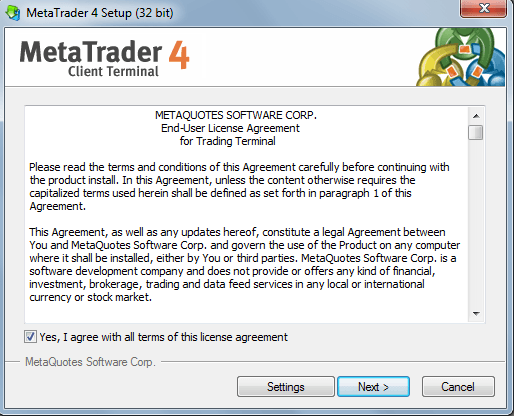
A setup file  (mt4setup) will be downloaded into your PC. Click on the mt4setup file to initiate the installation. You have to agree with their terms of this license agreement and then click next, as shown in the following figure:
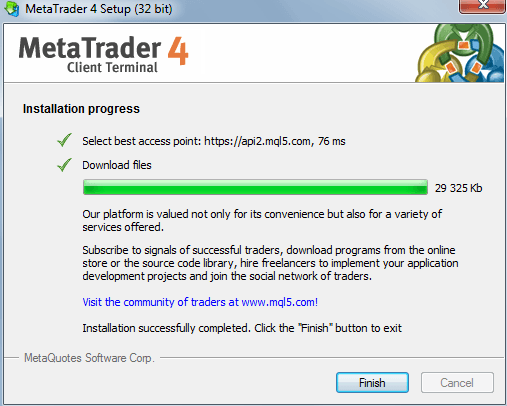
When the installation is successfully completed, click the finish button to exit.
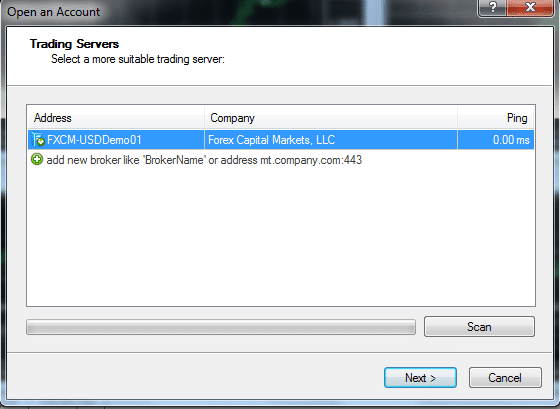
Now, click Next to open a demo account because without opening a demo account, you cannot operate this software.
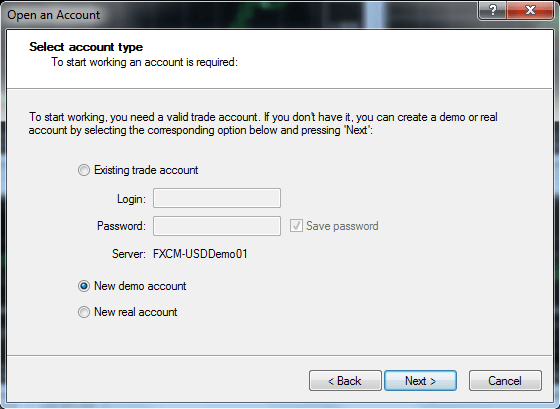
Select New Demo Account from the drop down menu, and then click next.
After clicking Next, a new popup window will appear. Fill in the blanks. Select currency, account type, leverage, and deposit. Select the radio button “I agree to subscribe to your newsletters”, and then click Next.
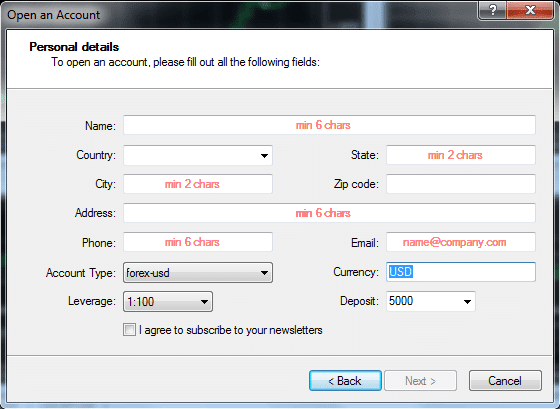
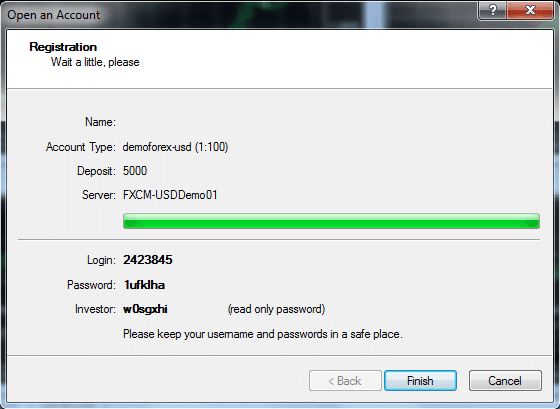
Now, you will get a user ID and password. Keep your user ID and password in a safe place. Click Finish to log in.
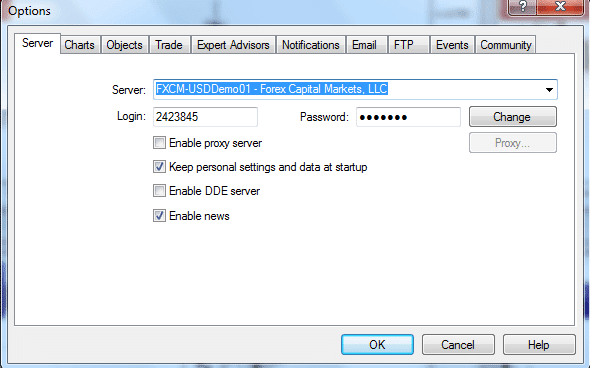
How to change the password on the MT4 platform
To change the password on the MT4 platform, click on the “Tools” located on the toolbar. Now, a popup window will appear. You can easily change your MT4 password from here.
How to Navigate the MT4 Platform
The following is a screen shot of what your MT4 platform will look like when you first open it up. MT4 opens with four different currency pair chart windows like the EURUSD, GBPUSD, USDCHF, and USDJPY charts.
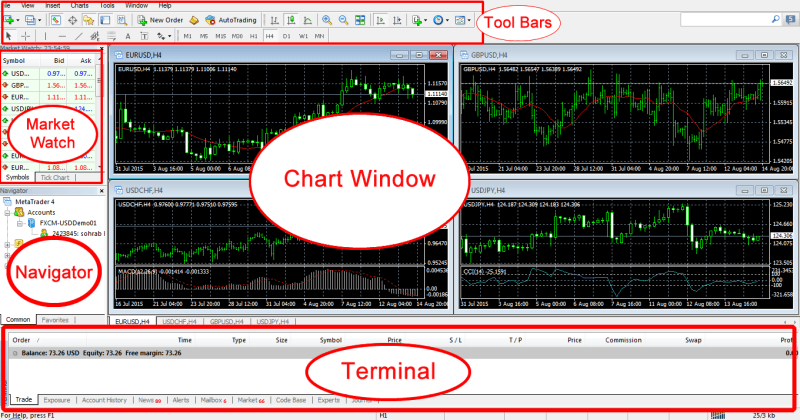
For the time being, let’s cover the primary elements of every window you find in the picture above:
– “Toolbars” is the first window located at the very top of the MT4 platform. In this window, you will find different icons to do different things. We have discussed these icons in the later part of this article.
– The next window of the MT4 platform is the “Chart” window. Here, you will see the running chart(s) you have open.
– Below the Chart window is the “Market Watch” window located at the top left corner of the MT4 platform. This window shows every pair (symbol) of the market available according to your broker, and shows you their current bid prices and asks prices. To see every symbol offered by your broker, just right click inside of the market watch window and click to “show all”. By pressing (Ctrl + m), you can easily hide / unhide the market watch window.
– The next window is the “Navigator” window. This window will show your username, indicators, expert advisors, and scripts. To hide / unhide the navigator window, press (Ctrl + n).
– At the bottom of the MT4 platform, you will see the “Terminal window” showing a few tabs within it: Trade, Exposure, Account History, News, Alerts, Mailbox, Market, Codebase, Experts, and Journal. You can click on every tab to get acquainted with what it means. But, the most important tab is the “Trade” where you can see the running and pending trades. The Account History tab shows your account activity like deposits, withdrawals, profit, or loss. You can find your full trading history from here. You can easily hide/unhide the terminal window by pressing (Ctrl + t).
How to setup your MT4 platform for clean price action trading
For a price action trading, we need to setup our MT4 platforms chart. According to your own personal style and color choices, you can customize your MT4 platforms chart. Personally, I like a white background with a black foreground. Here’s the way to setup a clean white chart for ideal price action trading:
How to open a chart
You can open a chart by three different ways:
A. Click on the File menu at the top left of the MT4, and then click “new chart”.
B. Right click on the specific currency pair you want to open in the “Market watch” segment, and then click “chart window”.
C. Just below the File menu bar, there is an icon named “new chart”. Click on that icon, and then select the specific currency pair you want to open.
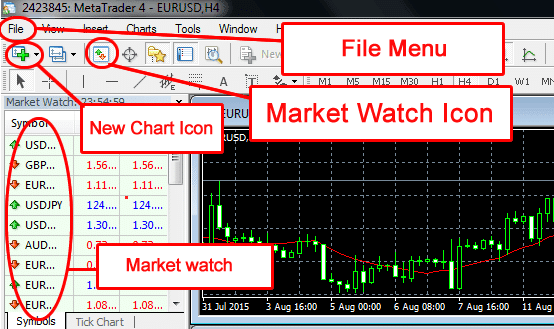
How to set the properties of a chart
Open your desired chart, then right-click the chart and select properties. Now, you will see a popup window appear.
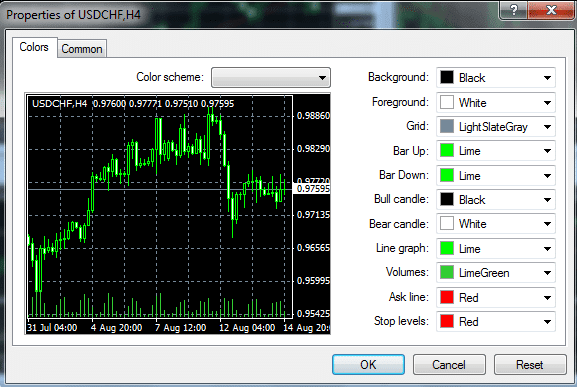
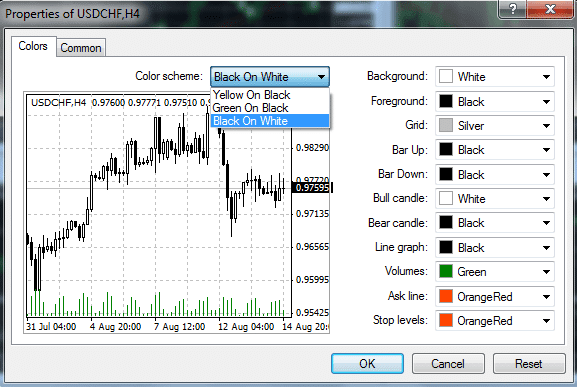
On the properties popup window, you will find a “color scheme”. By clicking on this color scheme, you can change the color of your chart. I have clicked on “Back on White” and my chart shows black and white candlesticks on a white background, as shown in the following figure:
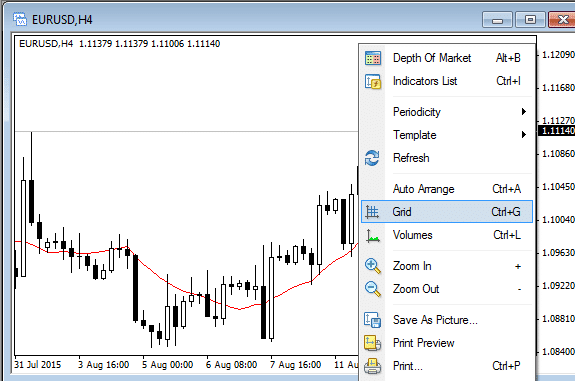
After that, you can take off the “grid” and “volume” by right clicking the chart and un-selecting grid and volume.
There is a “common” tab located at the right side of the “colors” tab. Using this common tab, you can change certain features like volume, grid, ask line, period separators, auto scroll, etc. You can also change the chart from candlestick to the bar chart or line chart through this common tab.
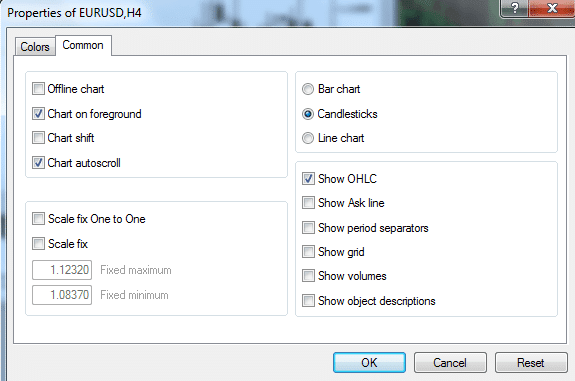
How to save your chart as a template
If you want to save the chart according to your desired color scheme and other chart properties, you can easily do it by saving the chart as a template.
To do this, click on the “Template icon” located at the top right corner of the toolbar, and then save the template. There is another way to save the template. Right click on the chart, then select template, then click on “save template”.
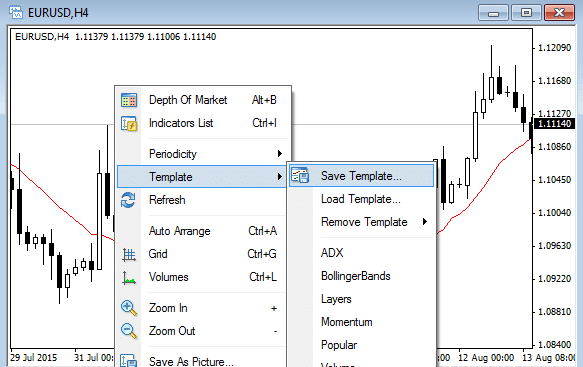
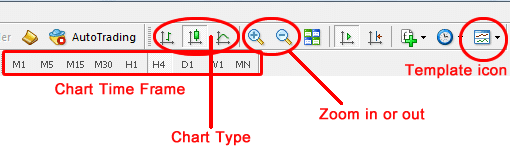
You can change the chart type by using the “chart type icon” located in the toolbar. You can select candlestick, bar chart, or line chart – whatever you want. But, I suggest you to use candlestick chart for better understanding the Forex market. You can use the zoom-in/zoom-out icon to make the chart zoom in or out. To change the time frame of the chart from 1 minute to monthly, use the time frame icon located in the toolbar.
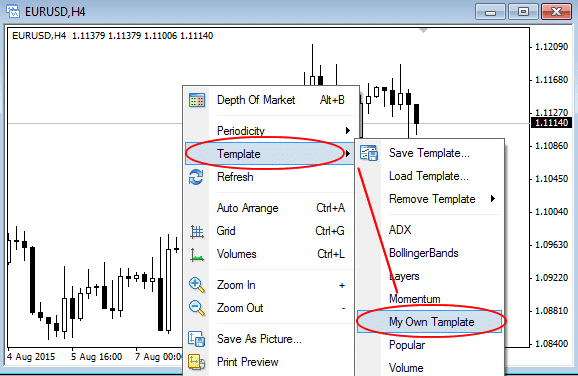
If you want to open a new chart with your existing template properties, you can easily do that. Open the new chart, right click on that chart, select template, then click on your previously saved template. Now, you will see your new chart having a new currency pair that will be converted to your previously saved template.
How to set up 4 different time frames of one currency pair
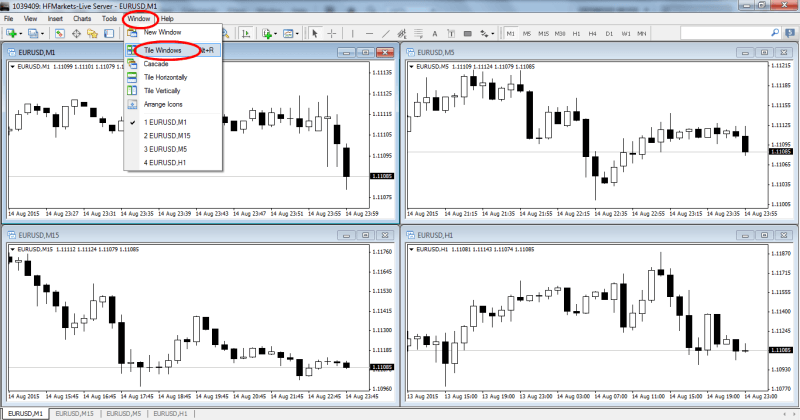
You can easily set up 4 different time frame charts of a single currency pair in the same screen. To do this, open 4 new charts having the same currency pair. Now, select each chart, and then click on the time frame icon gradually from 1 minute, 5 minutes, 15 minutes, and 1 hour. Now, click on “window”, which is located at the toolbar, and then click “Tile Windows”. You will see that MT4 will automatically set 4 different time frame charts of a single currency pair in the same screen.
How to analyze multiple markets quickly
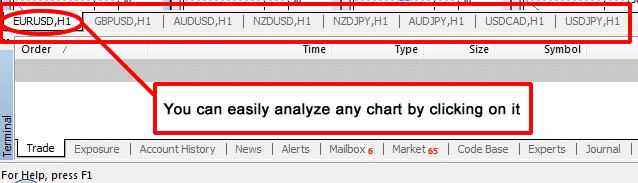
If you want to analyze as many different chart windows as you want in the MT4 platform, you can easily do it by clicking on the tabs at the bottom of the MT4 platform showing currency pairs name. You can easily edit any chart by clicking on it, and then using the toolbars icon just like we have already discussed.
How to setup more than 4 charts in the same screen
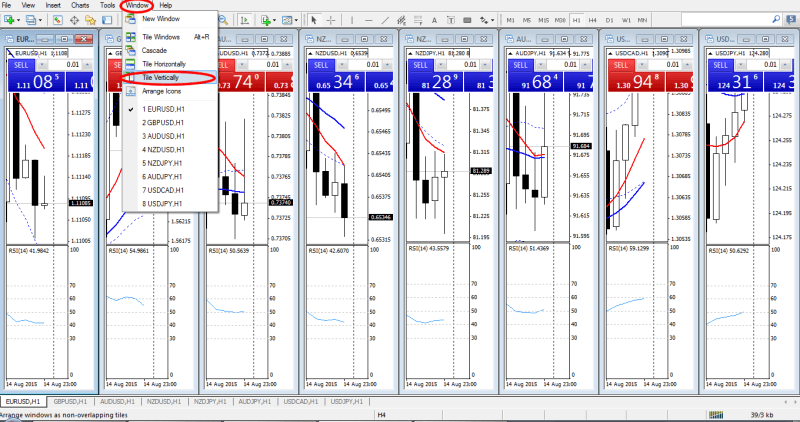
To set up more than 4 charts of the same timeframe or different timeframes in the same screen, open all those charts, then click on “Window”, then click “Tile Vertically”. Now, you will see all of your charts in the same screen, as shown in the following picture:
How to Open a Trade
You can open an entry using one of the following ways:
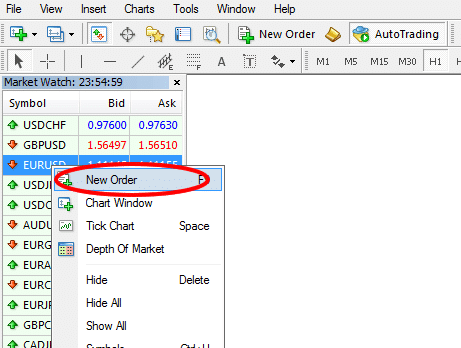
– Using Market Watch Window: Double click on the desired pair or right click on the desired pair, and then click “new order”. Then, set your desired volume and click on sell or buy. You may set Stop Loss and Take Profit at this time if you want.
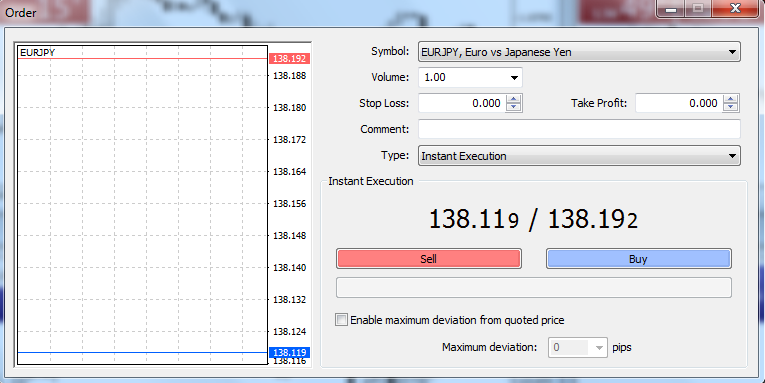
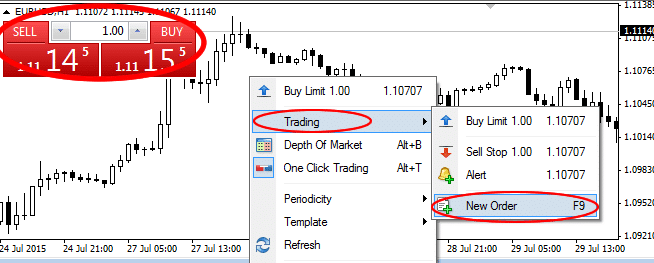
– Using an Active Chart: Right click on the active chart, then click on “trading”, and then “new order”. You can simply open an entry by clicking Sell / Buy located at the top left corner of the active chart, but to do this, you must set your desired volume first by pressing the arrow key or through the keyboard.
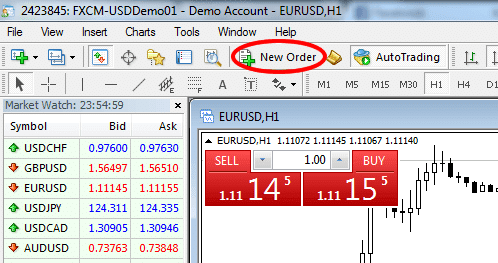
– Using the Toolbar: You can easily open an entry by clicking “new order” located on the toolbar.
- Using F9: There is a shortcut key in your keyboard (F9). You can open an entry by pressing F9.
How to Modify a Trade
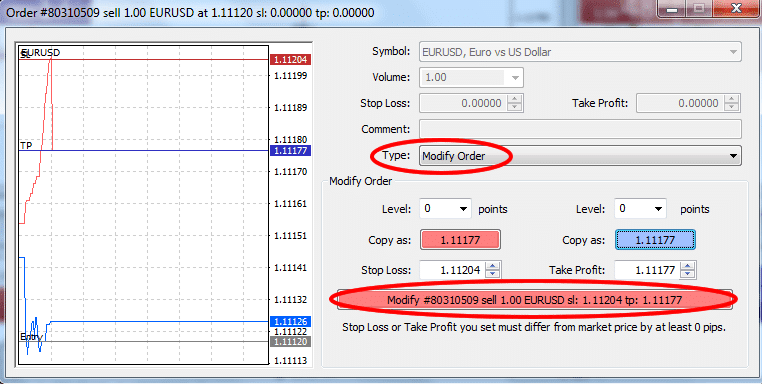
To modify a trade, open the terminal (Ctrl + t), then double click on the trade you want to modify. Now, you will find a popup window. Select “modify order” from the drop-down menu located beside “type”. Now, you can modify your “stop loss” or “take profit”, and then click on “modify” row located at the bottom of the popup window.
How to Close a Trade
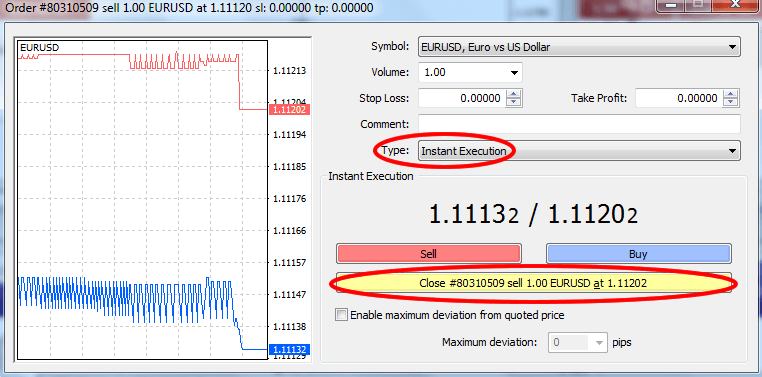
Just like the modify option, open the terminal, and then double click on the trade you want to close. Now, a popup window will open. Select “market execution” from the drop-down menu located beside “type”, and then click on “close” located at the bottom of the popup window.
How to Monitor Your Running Trade
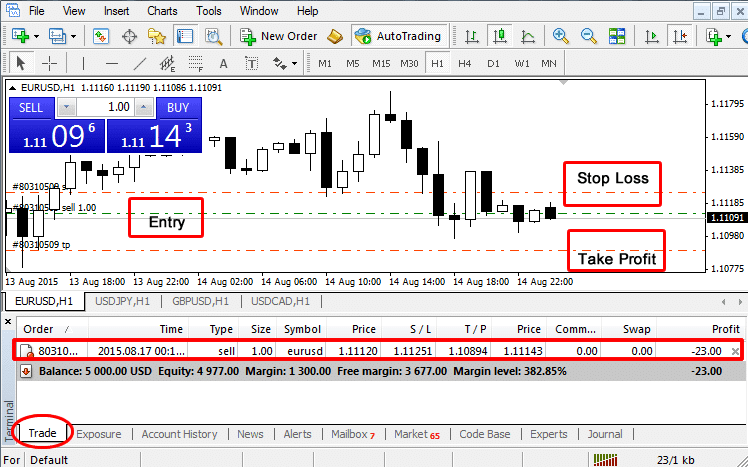
You can monitor your running trade either through the chart or through the “Trade” section of the terminal. You can easily view your terminal through a shortcut (Ctrl + t) or by clicking on “View” on the toolbar, and then selecting terminal.
How to check Your Trading History
To check your trading history, you have to open your terminal (Ctrl + t), and then click on “Account History”. Here, you will find each of your closed trades showing, trade entry time, type (buy/sell), size (trade volume), symbol (currency pair), entry price, stop loss, take profit, trade closing time, closing price, commission (not applicable for every trading account), swap (if you carry your trade from one day to another day, you have to pay a little as a swap charge), and finally, profit / loss.

Recap
I hope now you can easily set up your MetaTrader 4 platform for a clean and clear price action trading. If you have any questions at all, please just post them in the comments section below or send me an email.
You may be interested in the related lessons and articles of this post because I have added some related MT4 indicators and expert advisors that you can use now that you know how to use this really popular trading platform.

